


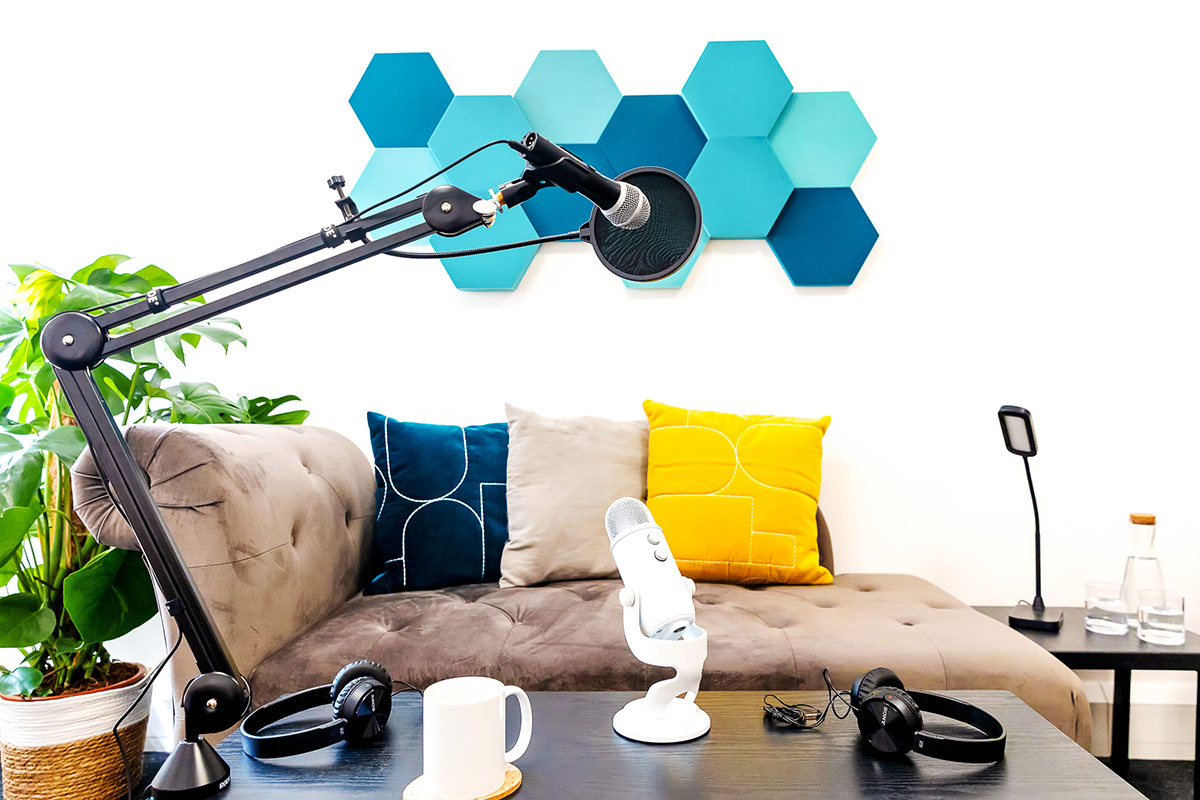
The podcast and video studio is a cosy room with plenty of lighting and furniture options. Added acoustic properties make it suitable for recording podcasts and videos, running livestreams, holding virtual workshops, taking calls, and even doing brand photo shoots.
Groups are welcome in the space, but you may want to book a tour first to check the studio meets your needs.
Please note that due to the proximity of the canal, we can’t guarantee your recordings will be quack-free!
Quick features summary:
- Acoustic wall panels and ceiling tiles.
- Carpeted floor.
- Various lighting and furniture options.
- Green screen backdrop available.
- Accessories, equipment and props provided.
- Includes access to kitchen and bathroom.

Make it more you
Tailor the space to suit you – arrange furniture, add your own signs, pictures and props to the shelves around the walls, choose from desk, sofa, or armchair setups, various lamp options, and more. We can provide different setup examples and colour styling options to give you some inspiration.
The Createry has a range of furniture you’re welcome to move into the studio as long as it’s not required by someone elsewhere in the space. This includes armchairs, meeting chairs, office chairs, stools, wooden chairs, wooden desks, side tables, laptop stands, and coffee tables. By default, the room includes a desk, chair, chaise longue, and small tables.
Podcasting and video equipment
A ring light, boom arm, headphone stands, headphones, two LED panel lights, colourful vertical lights, LED signs, tripods and a music/script/laptop stand are always available in the room. Microphones, webcams, vlogging cameras and a portable backdrop can be booked in advance from your members’ area.
Need a full equipment list, or have questions about specific items? Contact us.


Getting started
Book a tour (free) – If want to see if the space is suitable for your needs, please book a free visit. This takes about 10-15 minutes and also includes a look round the rest of The Createry.
Book the studio – You’re welcome to split the cost with a friend; however, the booking itself will need to be made by one person. Please ensure you add on enough time to set up and pack up.
If you’re a Fledgling or Songbird Createry member, you get free hours monthly, cheaper rates after that, and more hours and days you can book.
 (@salonsecretspodcast)
Frequently Asked Questions
I’ve never been to a podcast studio before, what help do you provide?
Don’t worry, most people are in the same boat. The first part of your first booking is an induction on how to use our equipment. Within 15-20 minutes, you’ll learn how to record your video or audio on a single camera or as a two camera split screen video, depending on your preferences. It’s less technical than you may think – as long as you can use a mouse you’ll be able to pick it up!
We recommend for your first session that you come in with low expectations and give yourself time to process everything and play around. Our studio is priced as such so there’s no pressure to create a Hollywood blockbuster day one!
If you’re already familiar with recording and just want an acoustic-friendly quiet space to create, you don’t need to do the induction if you prefer not to.
What do I need to bring?
Just yourself, and something to take your recordings away on, such as a USB stick or hard drive (the speediest option). You can also log in to your own cloud services such as iCloud, Dropbox, WeTransfer or Google Drive. Just remember you’ll need to leave time to transfer your files regardless of which method you use. You don’t need to bring a laptop as we have one in the studio.
Can I just record on my phone or tablet?
Yes, we have plenty of people who are happy to do just that. We have a mini RØDE microphone you can connect to your iPhone or Android phone for better sound quality – just ask! The studio also has freestanding and tabletop ring lights with phone holders, and a phone tripod.
Who records my video/audio?
We show you how to do it with a couple of button presses (you don’t need to be a tech wiz). We can recommend videographers and audio producers familiar with our studio if you’d prefer to hire a professional, but most people just hit record and go.
What are the extra costs involved?
There aren’t extra costs (unless you want to buy a USB stick). All our equipment, from tech to furniture to props, is included, and you hit the record button once you’re ready to start.
How long does it take to get my recording?
You leave the studio with your recording after copying it to your cloud storage or hard drive, so there’s no waiting days or weeks – it’s yours straight away.
Do you do editing?
Most people use an app like Capcut to edit; we don’t do editing ourselves but can recommend people you can hire, or you/one of your team can learn the essentials with one of our affordable one-to-one editing classes. This takes you through the ins and outs of all the things you want to know, such as cutting out “erms” or adding subtitles.
How many cameras do you have?
We have up to two cameras you can use. Please note that if you’re using our standard setup, both cameras are set to record split screen (either horizontal or vertical).
Can I bring my own equipment?
Yes, you’re responsible for setting it up and using it. If you’d like to integrate it with some of our equipment, that’s fine, but that’s on you – we can’t provide tech support for mix-and-match setups as we may not be familiar with what you’re bringing or what you’re looking to achieve. Please note that if you change any settings on our cameras or software, you need to restore them back to the originals before leaving the studio.
Can I use Riverside in your studio?
Yes, if you prefer to use your own Riverside account instead of the local recording software we have set up, that’s totally fine. Please bear in mind that if you are recording remotely with any guests using Riverside, they will need to have a good and stable internet connection.
Do you retain the copyright to my recordings like some studios do?
Absolutely not, everything you create at The Createry belongs to you, and you are the copyright holder.
What info do you need from me?
Before booking, please let us know if there’s anything you think you want that may not be part of our standard setup, or what you’re looking to achieve if you’re not sure what’s possible. If you have any accessibility requirements, please let us know by emailing hello@thecreatery.co and we’ll do our best to accommodate and make sure the space and access is what you need.